
WEBD 150 – The Developer Mindset 2
April 4, 2024 1:35 pm Leave your thoughtsThe Developer Mindset 2
Where do I start!?
Design
Being new to this HTML & CSS stuff can be overwhelming. As you do assignments, start new projects or perhaps even take on clients the first question you may ask yourself is: Where do I start?? There may be some things you don’t know how to do, things you don’t yet understand and you may be feeling like you don’t really know what you are doing. You also may feel as if you are not up to task because you don’t remember code. Let’s go over some things to combat this.
First off, let’s think of the “where do I start” part. To wrap our heads around that let’s look at an analogy. If you eat meat, and you were to eat a cow, how would you do it? If you are vegetarian, if you were to eat this jackfruit here, how would you do it?

Well the only way is to break it up into little bite-size pieces and eat it bit by bit. And that’s exactly how you will start.
But first, Imagine! This is the fun part of what we do as developers. Especially when it comes to deploying your own pet projects. Depending on how your mind works, some people can envision what they want in their minds and just deploy it in HTML and CSS. For example, sometimes if I know exactly what I want to get onto the screen I may be able to just start writing the CSS, in some cases before I even touch the HTML, and just lay it out. But sometimes depending on where I am mentally I may have to start with a mockup to get me going. They don’t even have to look good. As long as you get your idea out of your head it can help.
Header? All contained within a hero?
Page Structure?
What do I want my page to look like? Full width? 70% width with a background? This is a good place to start thinking…
When you start a new project don’t try to push it all out in one rip, especially if it’s an ambitious project involving things you have not done yet. Start with the HTML structure of the overall site, move on to the CSS and if you will need to write a large amount of CSS in the grand scheme, break it up into pieces, same with the HTML.
Once you have the overall structure of the page laid out, you can then start with the smaller parts of the page. You can develop them in separate files too if that makes it easier, then move them over to the main code and place the code where it needs to be.
Coding
As you progress in coding you will find it easier and easier to code the design in your head into your editor.
Remember that HTML is structure and CSS is design.
Make a list
What do you already know the web page(s) will consist of? This is easy… Most likely the usual stuff.
- Wrapper
- Navigation
- Header
- Main Content Area
- Secondary Content Area
- Footer
- Copywriting Section
<!doctype html>
<html>
<head>
<meta charset="UTF-8">
<title>Untitled Document</title>
</head>
<body>
<!-- Wrap -->
<div class="wrapper">
<!-- Header -->
<div class="header"> <!-- (Or just <header></header> semantically) -->
<h1>Welcome to My Site!</h1>
</div>
<!-- nav -->
<div class="nav"> <!--(Or just <nav></nav> semantically) -->
<li>Home</li>
<li>About</li>
<li>Location</li>
<li>Contact</li>
</div>
<!-- main -->
<div class="main-content"> <!-- (Or just <section></section> semantically) -->
<h2>The Art of Code</h2>
<p>some text, all content stuff</p>
</div>
<!-- main 2 -->
<div class="second-content"> <!-- (Or just <section></section> semantically) -->
<p>Some other stuff</p>
</div>
<!-- Footer -->
<div class="footer"> <!-- (Or just <footer></footer> semantically) -->
</div>
<!-- Copy -->
<div class="copy"> <!-- (Or just <footer></footer> semantically) -->
<p>© 2018 Humber College</p>
</div>
</div>
<!-- End Wrap -->
</body>
</html>You can write semantically too if you prefer…
From here you should already have a list of Classes/IDs in your head… Code ’em up in the order they will appear on the page, or in an OOCSS, SMACSS, or BEM format.
- html – if you need to change default stuff for the entire html tags
- body – if you need to change default stuff for the entire body tags
- h1 – if you need to change the look of the h1 text
- p – if you need to change the look of the paragraph text
- li – if you need to change the look of the list item text (if you decide to use them at all)
- .wrapper – your wrapper if you use one
- .nav – your navigation
- header – your header
- .main-content – your main content section
- .second-content – your secondary content if you have one
- .footer – your footer
- .copy – copyright section (© 20XX whatever website.com)
html {
}
body {
}
h1 {
}
p {
}
li {
}
.wrapper {
}
.nav {
}
.header {
}
.main-content {
}
.second-content {
}
.footer {
}
.copy {
}
From here you can already start building both the HTML & CSS… Then from there, scale it up by adding more and more to it!
What do you/client/boss need – want in the web page(s)? Different items?
- Contact forms
- Animated stuff
- Pop-ups
- Marquees
- Modal boxes
- Pricing boxes
- Whatever the heck else?
Well from here you can decipher where they will go on the page and thus into the HTML code and decide what you will call them as selectors for your CSS (remember you can use more than one selector), then build them separately if you need to in different files, then when finished port the code back over to the main file. If you don’t know how to build it, this is your chance to be resourceful and learn as you go!
Think in layers, think scalable
Think in layers from background to foreground and then down the page. All web pages for the most part work the same… How often do we see websites any different? For the most part they are pretty much the same…
Background to foreground, top to bottom. Simple! Maybe one day soon that will change with AR/VR but for now it’s all pretty much the same.
Remember to indent that HTML code, when you put more content within tags, indent them. Like putting something within a jar, the size of the stuff in the jar can never be bigger than the jar itself…
<div class="some-class-like-the-jar">
  <div class="the-stuff-within-the-jar">
    <p>Some content in the jar</p>
  </div>
</div>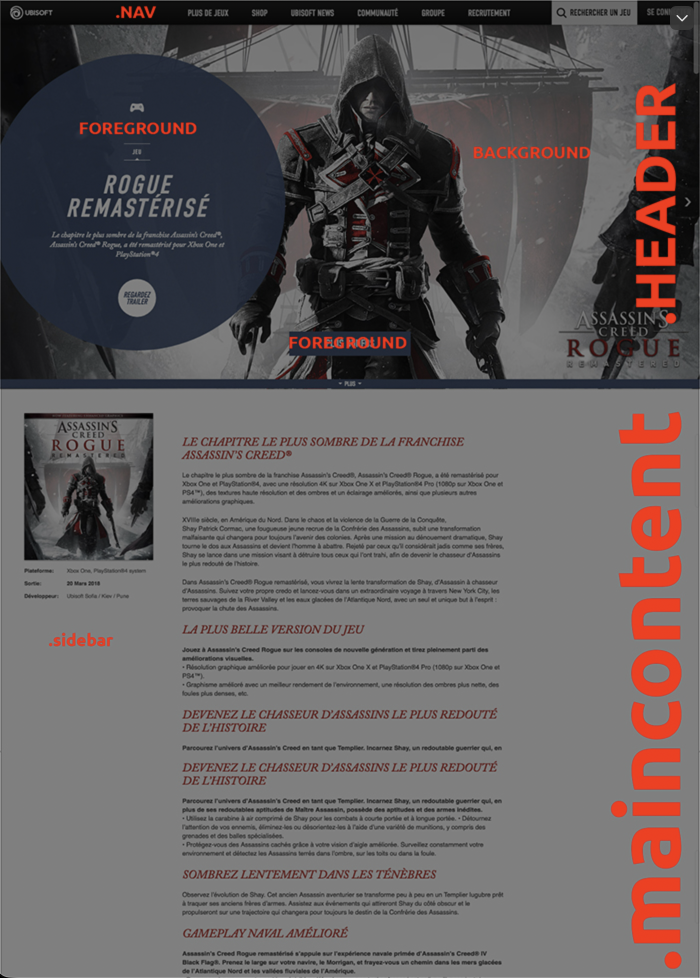
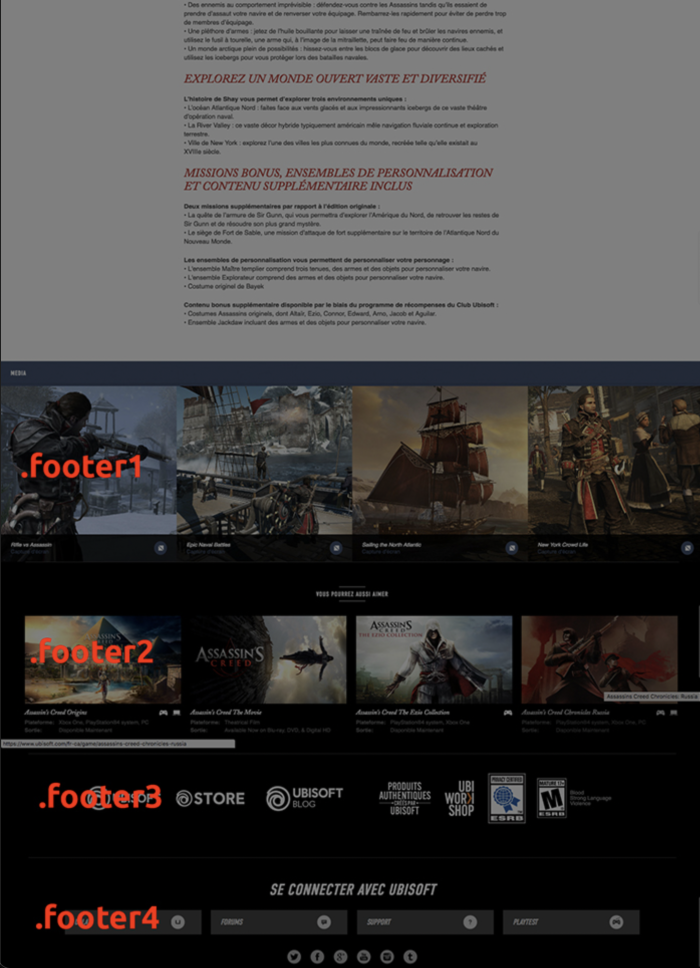

Still though, think scalability. Code can be added to as much as you need. The small stuff we do in here to learn can and will be scaled up. When deploying a project never limit your mind, always think in terms of the day this thing will be added to, and leave room for that.
Be Surgical, be specific…
Remember you can give elements on your page more than one class:
<div class="someclass another--class">
</div>
Allowing you to target one or the other within the CSS as you need it…
.someclass {
  height: 100vh;
  width: 100%;
}
.another--class {
  color: #777;
  font-size: 30px;
}
You can also combine selectors in the CSS…
.main-content h1 {
}
This will only select the h1 tags within the main content area.
Snippets
It’s ok to use code snippets from other developers, but actually take the time to understand what the code is doing. It’s understandable that when you are actually working in the field, time becomes of the essence especially when working with pushy clients/bosses that just want the job done and want it done yesterday. But try to take the time to comprehend what code snippets are doing and it will up your game.
Memorization
When it comes to remembering code in any language, keep in mind that not all developers remember code like one would remember words in a spoken language. Many developers, even the best ones out there reference code. This is part of the game. As I said in past lectures, being resourceful is one of the biggest assets. That’s being able to search for solutions for whatever it is you want to do. Google is your friend. However, code and code often, this will help you in remembering code.
Another thing you can do to remember code is to visualize something with it, attach certain codes to visual keys in your mind. Some people use this to memorize things.
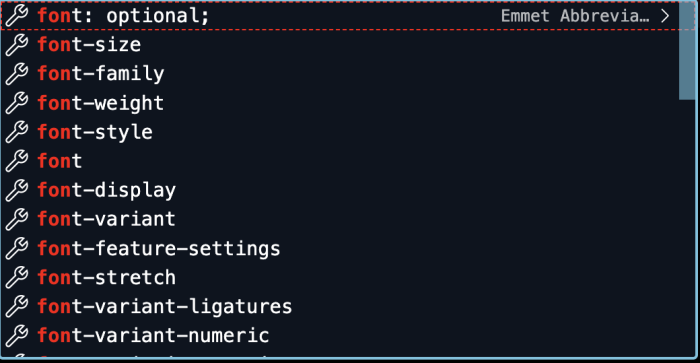
Look how many properties there are for fonts alone… Will you remember them all? Some might, but for others their mind may only remember the ones that are important, the ones they actually use on the regular.
Start with what you know. So far we have covered the basics and got into some higher level stuff. For the most part the HTML aspect should be way easier now than it was last semester. As we move on with new projects that have things in them that we have yet to cover, start the project anyway. Do the parts of the project that you know how to do, and save the other parts for later. This approach can be scaled up as well. If you are in the field and are tasked to do something you don’t fully know how to do, tackle the parts you do know. As you move through the project, you can learn the new aspects and find solutions to the problem, then deploy them. This will keep you learning and growing in the field.
Finishing Up
You may have to polish up code before finishing up, getting rid of whatever is not needed, cleaning out anything you were playing around with but did not use, combining all separate loaded CSS files into one large CSS file (loading a bunch of CSS files makes more requests to the server, many argue that it’s better to load 1 large CSS file than a bunch of separate CSS files), making sure everything is indented right in the HTML, making sure all files are stored in an organized file structure and any other house cleaning you may need to do before launching your alpha product. Remember to do this. Clean code and clean structure is paramount.
The Grand Scheme
Remember, development is a huge, huge field. You aren’t going to know everything. No one does. You may specialize in one thing and leave other things to other people. For example, for most of my development career I specialized in open source content management, working with Joomla!, WordPress and various other CMS systems. I still do to this day. In my earlier days I understood content management and the handling & organization of digital information more than I did HTML and CSS, but this led me to developing my skills as a developer both on the front end and back end of the job, bettering my skills as a coder, designer and host. This is why starting with what you know will lead to bigger opportunities as you learn more and more in the field and expand into new aspects of multimedia development. Always keep developing and learning. In fact in this field you never stop learning, this is part and parcel of what we do.
Categorised in: Lectures, WEBD 150
This post was written by amax