
MDCP 102 – Intro to CMS Systems & WordPress (Web)
April 1, 2024 9:59 pm Leave your thoughtsIntro to WordPress
What is WordPress? Before we answer this question, we should ask: what are content management systems?
Content Management Systems are software/web applications that are used to manage the creation, modification and deletion of digital content.
Content management systems are built with programming languages, such as PHP which run server side code to execute the functions of the CMS system.
CMS systems also use SQL databases to save the data on them.
Content Management Systems are built in such a way so that they can be launched without knowing how to code. However, not knowing how to code will limit what you can do with it. The more advanced you are with coding is the more custom things you can do with the CMS system.
CMS systems have to be installed onto a server. When you install it, the database tables are created for the site to function.
CMS Systems have a front end and back end.
Back end:
The CMS system, once installed, will allow the user to login to a back end admin panel where they can control all aspects of the website and its content.
Front end:
The CMS system has a front end facing part where users can access to see the front end website.
CMS systems allow the function of user signup (if you want to give users that ability).
CMS systems allow the changing and editing of templates to change the look of the front end site.
Other functionality may include:
- SEO-friendly URLs
- Integrated and online help, including discussion boards
- Group-based permission systems
- Full template support and customizable templates
- Easy wizard-based install and versioning procedures
- Admin panel with multiple language support
- Content hierarchy with unlimited depth and size
- Minimal server requirements
- Integrated file managers
- Integrated audit logs
- Support AMP page for Google
- Support schema markup
- Designed as per Google quality guidelines for website architecture
- Availability of plug-ins for additional functionalities
- Security precautions such as 2 Factor Authentication
There are many types of CMS systems. WordPress being just one among many of the free and open source varieties. There are also proprietary CMS systems.
Some of the free and open source (GNU) license CMS systems:
- WordPress
- Joomla
- Drupal
- Elgg
- PhpBB Forums
Dynamic Web Content
What we have been learning so far is how to build static web pages using HTML and CSS. For all intents and purposes, not many people use that method to deploy web sites anymore. The reason being, not everyone knows how to write HTML.
On top of that, to change the content on a static website, one would need to download the HTML file, open it in an editor, change the content and then re upload it to the web server. For a developer this isn’t an issue but for a business owner that isn’t tech savvy, this isn’t a viable solution.
The CMS system makes it easier for everyday people to maintain and create content on their sites. All they have to do is login and understand how to use the back end admin panel.

The CMS system will have something like articles, pages, blog posts or something to this effect that will constitute different types of content and the user can create, edit and delete them using the back end admin panel at will.
WordPress
WordPress itself has 2 different ways you can use it.
https://wordpress.com/
Is a turnkey solution that is hosted by wordpress.com. It allows you to make a WordPress site sort of like a wix type site. Because of this you have a lot less control in regards to what you can do and customize.
https://wordpress.org/
Is a self hosted solution, with WordPress.org, you download a copy of WordPress which you can upload to your own hosting and install. With it you have full access and control to the open source code and can edit it/customize it at your will.
Once again, your ability to customize WordPress will be dependent on your skill level, learning HTML, CSS and PHP. However, you can use WordPress without knowing any of these languages. Just being a little tech savvy will allow a user to install and configure a WordPress site and change a template.
Hosting
Before we can install WordPress, we need hosting. There are a couple free solutions we can use to practice.
https://www.000webhost.com/
https://www.infinityfree.com/
In most cases I would say: Sign up for the hosting of your choosing. However in this instance 000webhost.com seems to be the better option to install WordPress as they have push button install solution.
With that being said. We must understand that a paid hosting service IS the superior option to run WordPress properly. (Free web hosts are not reliable and often times glitch out when you try to upload large files and have issues when trying to work.)

Once you sign up for 000webhost. Click “Create a new website”.
Select “WordPress Website”.
Name the site and enter a password. Remember to write down the password somewhere so you don’t forget it.
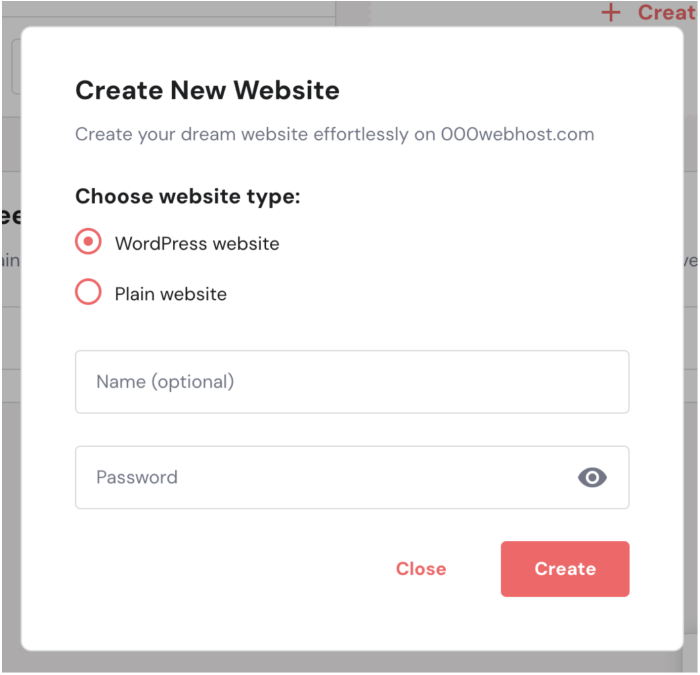
Once you click “Create” the server should create with a fresh copy of WordPress installed on the server.
Categorised in: Lectures, MDCP 102
This post was written by amax